Enrollment adds up
Randomized equals assessed for eligibility minus excluded.
Assessed (412) minus excluded (112) is 300, but randomized is 290.
Enter your trial counts and download a CONSORT flow diagram that adds up.
%3C%2Ftext%3E%0A%3Crect%20x%3D%22500%22%20y%3D%2288%22%20width%3D%22284%22%20height%3D%22110%22%20fill%3D%22%23ffffff%22%20stroke%3D%22%231f2937%22%20stroke-width%3D%221.4%22%2F%3E%0A%3Ctext%20x%3D%22512%22%20y%3D%22110.96%22%20fill%3D%22%231f2937%22%3EExcluded%20(n%3D112)%3C%2Ftext%3E%0A%3Ctext%20x%3D%22512%22%20y%3D%22128.96%22%20fill%3D%22%231f2937%22%3E%E2%80%A2%3C%2Ftext%3E%0A%3Ctext%20x%3D%22526%22%20y%3D%22128.96%22%20fill%3D%22%231f2937%22%3ENot%20meeting%20inclusion%20criteria%3C%2Ftext%3E%0A%3Ctext%20x%3D%22526%22%20y%3D%22146.96%22%20fill%3D%22%231f2937%22%3E(n%3D74)%3C%2Ftext%3E%0A%3Ctext%20x%3D%22512%22%20y%3D%22164.96%22%20fill%3D%22%231f2937%22%3E%E2%80%A2%3C%2Ftext%3E%0A%3Ctext%20x%3D%22526%22%20y%3D%22164.96%22%20fill%3D%22%231f2937%22%3EDeclined%20to%20participate%20(n%3D29)%3C%2Ftext%3E%0A%3Ctext%20x%3D%22512%22%20y%3D%22182.96%22%20fill%3D%22%231f2937%22%3E%E2%80%A2%3C%2Ftext%3E%0A%3Ctext%20x%3D%22526%22%20y%3D%22182.96%22%20fill%3D%22%231f2937%22%3EOther%20reasons%20(n%3D9)%3C%2Ftext%3E%0A%3Crect%20x%3D%22354%22%20y%3D%22224%22%20width%3D%22220%22%20height%3D%2238%22%20fill%3D%22%23ffffff%22%20stroke%3D%22%231f2937%22%20stroke-width%3D%221.4%22%2F%3E%0A%3Ctext%20x%3D%22464%22%20y%3D%22246.96%22%20text-anchor%3D%22middle%22%20fill%3D%22%231f2937%22%3ERandomized%20(n%3D300)%3C%2Ftext%3E%0A%3Crect%20x%3D%22144%22%20y%3D%22308%22%20width%3D%22280%22%20height%3D%22182%22%20fill%3D%22%23ffffff%22%20stroke%3D%22%231f2937%22%20stroke-width%3D%221.4%22%2F%3E%0A%3Ctext%20x%3D%22156%22%20y%3D%22330.96%22%20fill%3D%22%231f2937%22%3EAllocated%20to%20supervised%20exercise%3C%2Ftext%3E%0A%3Ctext%20x%3D%22156%22%20y%3D%22348.96%22%20fill%3D%22%231f2937%22%3E(n%3D150)%3C%2Ftext%3E%0A%3Ctext%20x%3D%22156%22%20y%3D%22366.96%22%20fill%3D%22%231f2937%22%3E%E2%80%A2%3C%2Ftext%3E%0A%3Ctext%20x%3D%22170%22%20y%3D%22366.96%22%20fill%3D%22%231f2937%22%3EReceived%20allocated%20intervention%3C%2Ftext%3E%0A%3Ctext%20x%3D%22170%22%20y%3D%22384.96%22%20fill%3D%22%231f2937%22%3E(n%3D144)%3C%2Ftext%3E%0A%3Ctext%20x%3D%22156%22%20y%3D%22402.96%22%20fill%3D%22%231f2937%22%3E%E2%80%A2%3C%2Ftext%3E%0A%3Ctext%20x%3D%22170%22%20y%3D%22402.96%22%20fill%3D%22%231f2937%22%3EDid%20not%20receive%20allocated%3C%2Ftext%3E%0A%3Ctext%20x%3D%22170%22%20y%3D%22420.96%22%20fill%3D%22%231f2937%22%3Eintervention%20(n%3D6)%3C%2Ftext%3E%0A%3Ctext%20x%3D%22170%22%20y%3D%22438.96%22%20fill%3D%22%231f2937%22%3E%E2%80%93%3C%2Ftext%3E%0A%3Ctext%20x%3D%22184%22%20y%3D%22438.96%22%20fill%3D%22%231f2937%22%3EWithdrew%20consent%20before%20first%3C%2Ftext%3E%0A%3Ctext%20x%3D%22184%22%20y%3D%22456.96%22%20fill%3D%22%231f2937%22%3Esession%20(n%3D4)%3C%2Ftext%3E%0A%3Ctext%20x%3D%22170%22%20y%3D%22474.96%22%20fill%3D%22%231f2937%22%3E%E2%80%93%3C%2Ftext%3E%0A%3Ctext%20x%3D%22184%22%20y%3D%22474.96%22%20fill%3D%22%231f2937%22%3ECould%20not%20attend%20sessions%20(n%3D2)%3C%2Ftext%3E%0A%3Crect%20x%3D%22504%22%20y%3D%22308%22%20width%3D%22280%22%20height%3D%22182%22%20fill%3D%22%23ffffff%22%20stroke%3D%22%231f2937%22%20stroke-width%3D%221.4%22%2F%3E%0A%3Ctext%20x%3D%22516%22%20y%3D%22330.96%22%20fill%3D%22%231f2937%22%3EAllocated%20to%20usual%20care%20(n%3D150)%3C%2Ftext%3E%0A%3Ctext%20x%3D%22516%22%20y%3D%22348.96%22%20fill%3D%22%231f2937%22%3E%E2%80%A2%3C%2Ftext%3E%0A%3Ctext%20x%3D%22530%22%20y%3D%22348.96%22%20fill%3D%22%231f2937%22%3EReceived%20allocated%20intervention%3C%2Ftext%3E%0A%3Ctext%20x%3D%22530%22%20y%3D%22366.96%22%20fill%3D%22%231f2937%22%3E(n%3D150)%3C%2Ftext%3E%0A%3Ctext%20x%3D%22516%22%20y%3D%22384.96%22%20fill%3D%22%231f2937%22%3E%E2%80%A2%3C%2Ftext%3E%0A%3Ctext%20x%3D%22530%22%20y%3D%22384.96%22%20fill%3D%22%231f2937%22%3EDid%20not%20receive%20allocated%3C%2Ftext%3E%0A%3Ctext%20x%3D%22530%22%20y%3D%22402.96%22%20fill%3D%22%231f2937%22%3Eintervention%20(n%3D0)%3C%2Ftext%3E%0A%3Crect%20x%3D%22144%22%20y%3D%22524%22%20width%3D%22280%22%20height%3D%22152%22%20fill%3D%22%23ffffff%22%20stroke%3D%22%231f2937%22%20stroke-width%3D%221.4%22%2F%3E%0A%3Ctext%20x%3D%22156%22%20y%3D%22546.96%22%20fill%3D%22%231f2937%22%3EDiscontinued%20intervention%20(n%3D11)%3C%2Ftext%3E%0A%3Ctext%20x%3D%22156%22%20y%3D%22564.96%22%20fill%3D%22%231f2937%22%3E%E2%80%A2%3C%2Ftext%3E%0A%3Ctext%20x%3D%22170%22%20y%3D%22564.96%22%20fill%3D%22%231f2937%22%3EKnee%20pain%20flare%20(n%3D5)%3C%2Ftext%3E%0A%3Ctext%20x%3D%22156%22%20y%3D%22582.96%22%20fill%3D%22%231f2937%22%3E%E2%80%A2%3C%2Ftext%3E%0A%3Ctext%20x%3D%22170%22%20y%3D%22582.96%22%20fill%3D%22%231f2937%22%3ETime%20constraints%20(n%3D6)%3C%2Ftext%3E%0A%3Ctext%20x%3D%22156%22%20y%3D%22606.96%22%20fill%3D%22%231f2937%22%3ELost%20to%20follow-up%20for%20primary%3C%2Ftext%3E%0A%3Ctext%20x%3D%22156%22%20y%3D%22624.96%22%20fill%3D%22%231f2937%22%3Eoutcome%20(n%3D8)%3C%2Ftext%3E%0A%3Ctext%20x%3D%22156%22%20y%3D%22642.96%22%20fill%3D%22%231f2937%22%3E%E2%80%A2%3C%2Ftext%3E%0A%3Ctext%20x%3D%22170%22%20y%3D%22642.96%22%20fill%3D%22%231f2937%22%3ECould%20not%20be%20contacted%20(n%3D6)%3C%2Ftext%3E%0A%3Ctext%20x%3D%22156%22%20y%3D%22660.96%22%20fill%3D%22%231f2937%22%3E%E2%80%A2%3C%2Ftext%3E%0A%3Ctext%20x%3D%22170%22%20y%3D%22660.96%22%20fill%3D%22%231f2937%22%3EMoved%20away%20(n%3D2)%3C%2Ftext%3E%0A%3Crect%20x%3D%22504%22%20y%3D%22524%22%20width%3D%22280%22%20height%3D%22152%22%20fill%3D%22%23ffffff%22%20stroke%3D%22%231f2937%22%20stroke-width%3D%221.4%22%2F%3E%0A%3Ctext%20x%3D%22516%22%20y%3D%22546.96%22%20fill%3D%22%231f2937%22%3EDiscontinued%20intervention%20(n%3D0)%3C%2Ftext%3E%0A%3Ctext%20x%3D%22516%22%20y%3D%22570.96%22%20fill%3D%22%231f2937%22%3ELost%20to%20follow-up%20for%20primary%3C%2Ftext%3E%0A%3Ctext%20x%3D%22516%22%20y%3D%22588.96%22%20fill%3D%22%231f2937%22%3Eoutcome%20(n%3D11)%3C%2Ftext%3E%0A%3Ctext%20x%3D%22516%22%20y%3D%22606.96%22%20fill%3D%22%231f2937%22%3E%E2%80%A2%3C%2Ftext%3E%0A%3Ctext%20x%3D%22530%22%20y%3D%22606.96%22%20fill%3D%22%231f2937%22%3ECould%20not%20be%20contacted%20(n%3D9)%3C%2Ftext%3E%0A%3Ctext%20x%3D%22516%22%20y%3D%22624.96%22%20fill%3D%22%231f2937%22%3E%E2%80%A2%3C%2Ftext%3E%0A%3Ctext%20x%3D%22530%22%20y%3D%22624.96%22%20fill%3D%22%231f2937%22%3EWithdrew%20consent%20(n%3D2)%3C%2Ftext%3E%0A%3Crect%20x%3D%22144%22%20y%3D%22710%22%20width%3D%22280%22%20height%3D%2280%22%20fill%3D%22%23ffffff%22%20stroke%3D%22%231f2937%22%20stroke-width%3D%221.4%22%2F%3E%0A%3Ctext%20x%3D%22156%22%20y%3D%22732.96%22%20fill%3D%22%231f2937%22%3EAnalyzed%20for%20primary%20outcome%3C%2Ftext%3E%0A%3Ctext%20x%3D%22156%22%20y%3D%22750.96%22%20fill%3D%22%231f2937%22%3E(n%3D142)%3C%2Ftext%3E%0A%3Ctext%20x%3D%22156%22%20y%3D%22774.96%22%20fill%3D%22%231f2937%22%3EExcluded%20from%20analysis%20(n%3D0)%3C%2Ftext%3E%0A%3Crect%20x%3D%22504%22%20y%3D%22710%22%20width%3D%22280%22%20height%3D%2280%22%20fill%3D%22%23ffffff%22%20stroke%3D%22%231f2937%22%20stroke-width%3D%221.4%22%2F%3E%0A%3Ctext%20x%3D%22516%22%20y%3D%22732.96%22%20fill%3D%22%231f2937%22%3EAnalyzed%20for%20primary%20outcome%3C%2Ftext%3E%0A%3Ctext%20x%3D%22516%22%20y%3D%22750.96%22%20fill%3D%22%231f2937%22%3E(n%3D139)%3C%2Ftext%3E%0A%3Ctext%20x%3D%22516%22%20y%3D%22774.96%22%20fill%3D%22%231f2937%22%3EExcluded%20from%20analysis%20(n%3D0)%3C%2Ftext%3E%0A%3C%2Fsvg%3E)
Editing in the canvas needs a free account.
Each CONSORT flow diagram here shows a fictional trial drawn by this generator. Load one to see how the counts map to the boxes, then replace them with your own.
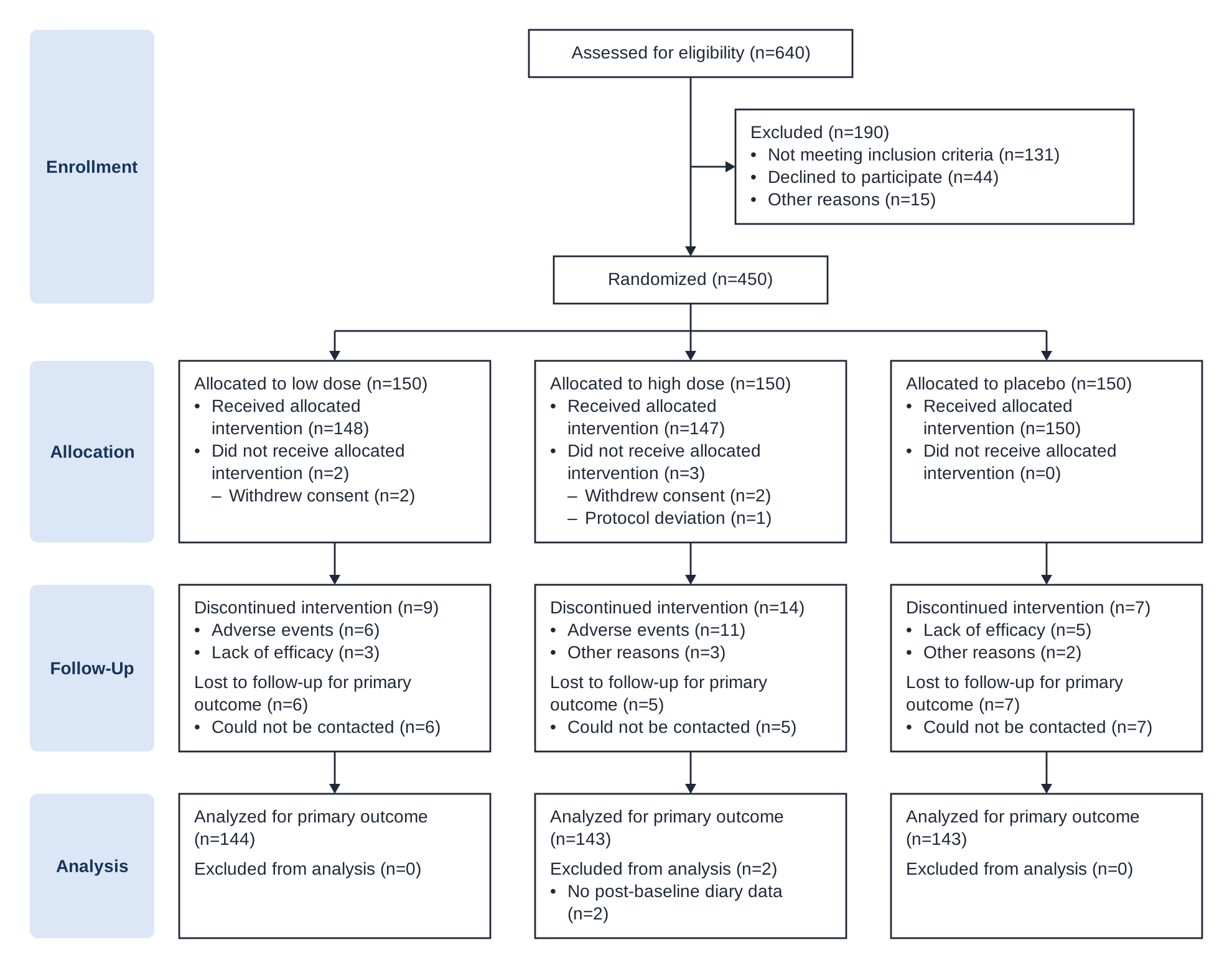
Low-dose and high-dose treatment versus placebo for migraine prevention. One randomized box splits into three columns of 150 participants, each with its own losses and reasons.
Four stages follow every participant from the eligibility check to the primary analysis. Each box gives a count, and every loss or exclusion gives a reason.
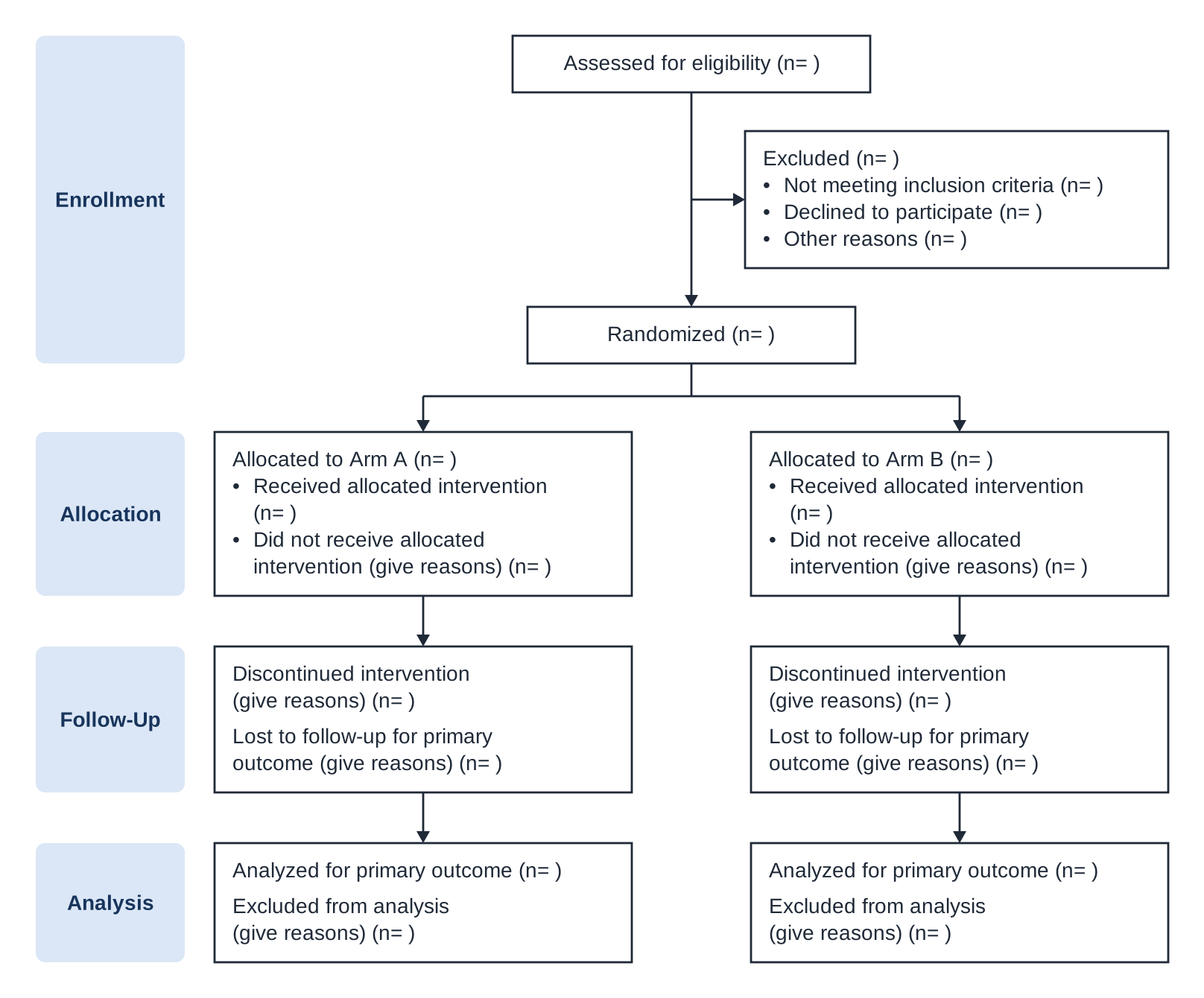
Everyone assessed for eligibility, the people excluded before randomization with reasons, and the number randomized.
For each arm: how many were allocated, how many received the intervention as allocated, and why the rest did not.
Who discontinued the intervention and who was lost to follow-up for the primary outcome, with reasons.
How many were included in the primary analysis, and why anyone was excluded from it.
The 2025 template lists “Discontinued intervention” before losses, asks for losses “for primary outcome,” and labels the analysis box “Analysed for primary outcome.” CONSORT 2025 replaces the 2010 statement; switch the wording to 2010 only for a manuscript that started with the older template.
The generator compares related boxes as you type. When numbers disagree, it shows which ones and by how much. It never blocks a download.
Randomized equals assessed for eligibility minus excluded.
Assessed (412) minus excluded (112) is 300, but randomized is 290.
The allocated counts across all arms equal the number randomized.
Arms add up to 296 allocated, but 300 were randomized.
Received plus did not receive equals allocated. Analyzed equals allocated minus losses and exclusions, or allocated minus exclusions when missing outcomes were imputed.
Supervised exercise: 150 allocated − 8 lost − 0 excluded is 142, but analyzed is 145.
When every reason has a count, the counts add up to the box total.
Excluded: reasons add up to 108, but the total is 112.
The flow diagram is usually Figure 1 in the Results. CONSORT 2025 item 22 asks for it, together with losses and exclusions after randomization and their reasons.
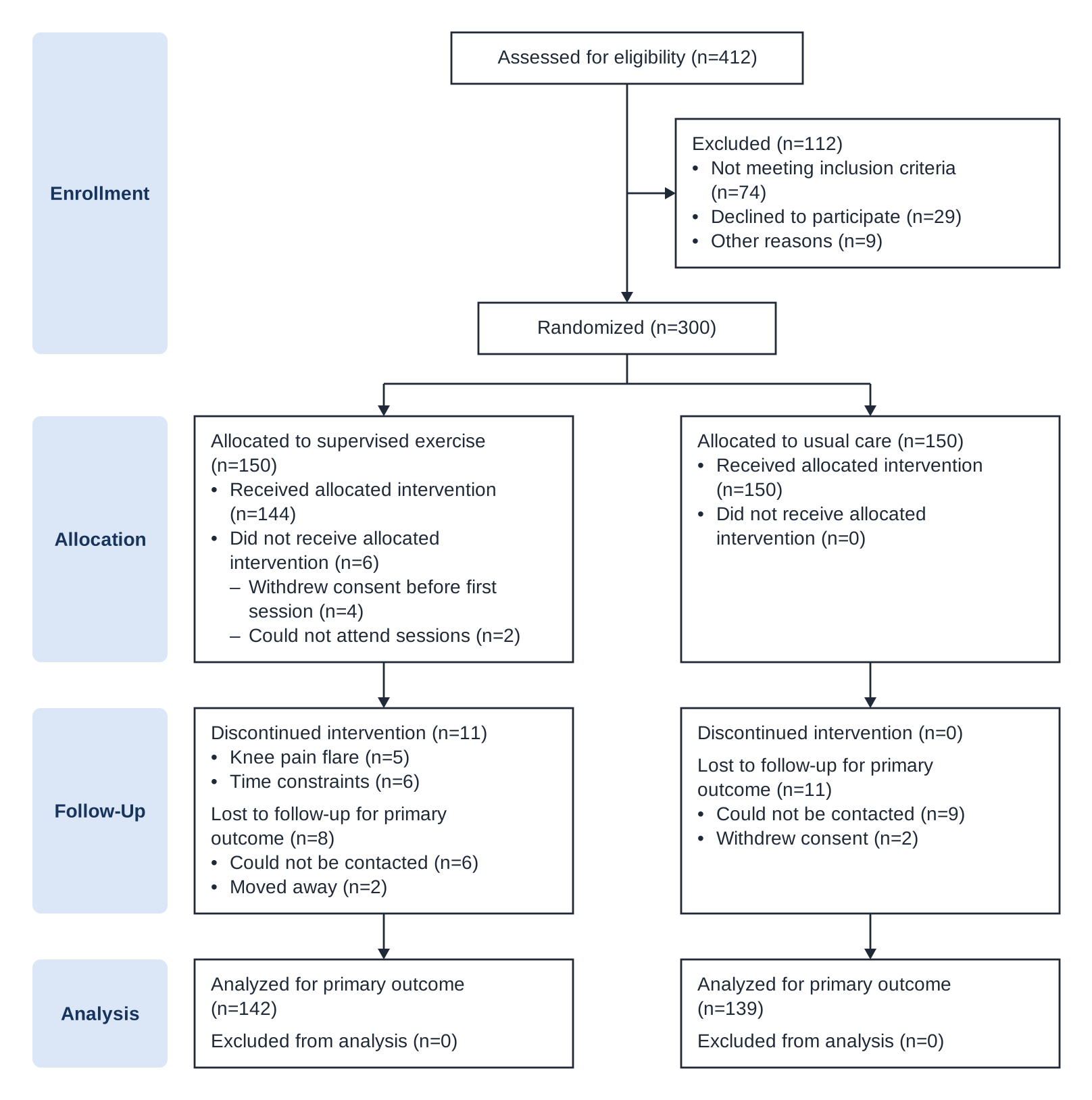
Between March 2024 and January 2025, 412 adults with knee osteoarthritis were assessed for eligibility and 300 were randomized: 150 to supervised exercise and 150 to usual care (Figure 1).
Primary outcome data were available for 142 participants in the exercise group and 139 in the usual care group. Reasons for discontinuation and loss to follow-up are shown in Figure 1.
Answers to common questions about the diagram and this generator.
A CONSORT flow diagram shows how participants moved through a randomized trial: how many were assessed for eligibility, excluded, randomized, and allocated to each arm, and how many discontinued, were lost to follow-up, and were analyzed. It is also called a CONSORT diagram or CONSORT flow chart. Item 22 of the CONSORT 2025 checklist asks trial reports to include one.
CONSORT 2025. The box wording here matches its flow diagram template. If your manuscript uses the older template, switch the wording to CONSORT 2010 to draw a CONSORT 2010 flow diagram. See the CONSORT 2025 statement (BMJ 2025;388:e081123) and the official CONSORT site. Figran is not affiliated with the CONSORT group.
Yes. Choose Clear all counts and leave the counts empty, so every box shows “(n= )”, then download the SVG or PNG. Clear the arm names too if you want “Arm A” and “Arm B” instead of the example’s names. The blank template follows the wording (CONSORT 2025 or 2010) and the number of arms (2 to 4) you choose.
Choose 3 arms and give each arm a name. The randomized box splits into three columns, and each column has its own allocation, follow-up, and analysis counts. The generator checks that the three allocated counts add up to the number randomized. Four arms, such as a 2×2 factorial trial, work the same way.
It checks the arithmetic between related boxes, reason counts against their totals, and duplicate arm names. It doesn’t review your trial against the CONSORT checklist or certify a report. Warnings never block a download.
No. Entering counts and downloading SVG or PNG files works without signing in, and your counts stay in your browser. To keep editing the diagram box by box, choose Edit in canvas and sign in.
Yes. Insert the SVG into Word or PowerPoint; Microsoft 365 can convert it to shapes for editing. The PNG is 300 DPI, so it stays sharp in print. To change individual boxes and arrows, use Edit in canvas.
No. A CONSORT diagram follows participants through a randomized trial. A PRISMA diagram follows records and studies through the screening stages of a systematic review. To draw one, use the PRISMA Flow Diagram Generator.
Enter your counts, fix any mismatches, and download the flow diagram for your Results section.